

CVNexa Resume Builder is a free tool for job seekers who want to create a clean, practical, and ATS-friendly resume online with zero charge. Many resume builders only collect text and place it into a template without helping users improve the quality of the final resume. CVNexa Resume Builder is designed to do more than that. It helps users build a clearer resume, improve structured data, keep formatting ATS-friendly, and move smoothly into the next steps of the job application process.
If you want to try the tool directly, you can start here: CVNexa Resume Builder.
What is CVNexa Resume Builder?
CVNexa Resume Builder is a free online resume builder and online CV maker designed for job seekers who want to create a professional resume with a clearer structure and a more practical workflow. It helps users organize key resume sections such as contact information, professional summary, work experience, education, skills, languages, certifications, and projects.
The tool is built to support modern hiring needs by keeping the layout readable, improving important data fields, and maintaining a cleaner ATS-friendly format. Instead of making users feel locked into a complicated process, the builder stays live and interactive while the preview remains visible during editing.
Because CVNexa Resume Builder is completely free for now, it gives job seekers a practical way to create a resume online without paying for premium access before they can even export a useful document.
Why CVNexa Resume Builder is Different
Many online resume builders focus too heavily on visual design while ignoring the structured data quality that recruiters and applicant tracking systems rely on. CVNexa takes a more practical approach by helping users build resumes that are cleaner, more consistent, and easier to export.
The builder is designed to support:
- ATS-friendly formatting
- country-based CV and resume styles
- live preview while editing
- guided structured fields
- cleaner export through native print-to-PDF workflow
- connected workflow handoff to other CVNexa tools
- free access with zero tool charge at the current stage
This makes it useful not only for first-time job seekers, but also for professionals who want to rebuild or modernize an existing resume.
Why ATS-Friendly Resume Builders Matter
A strong ATS-friendly resume builder is not only about simple design. It is also about clean structure, readable sections, and consistent resume data. Many employers use Applicant Tracking Systems to scan resumes before a recruiter reviews them, so broken contact details, messy formatting, and inconsistent section labels can weaken a good application.
According to public resume guidance from Jobscan, standard headings and simpler formatting can improve ATS readability. General resume-writing guidance from Indeed Career Advice also supports using clear structure and practical writing.
CVNexa Resume Builder is designed to reduce common resume builder mistakes such as:
- broken email or phone formatting
- inconsistent section headings
- over-designed layouts that hurt readability
- missing sections that weaken resume quality
- poor export reliability
How CVNexa Resume Builder Works
The tool works by combining guided inputs, live formatting, structured data cleanup, and a real-time resume preview. Instead of waiting until the end to discover mistakes, users can see their resume take shape as they build it.
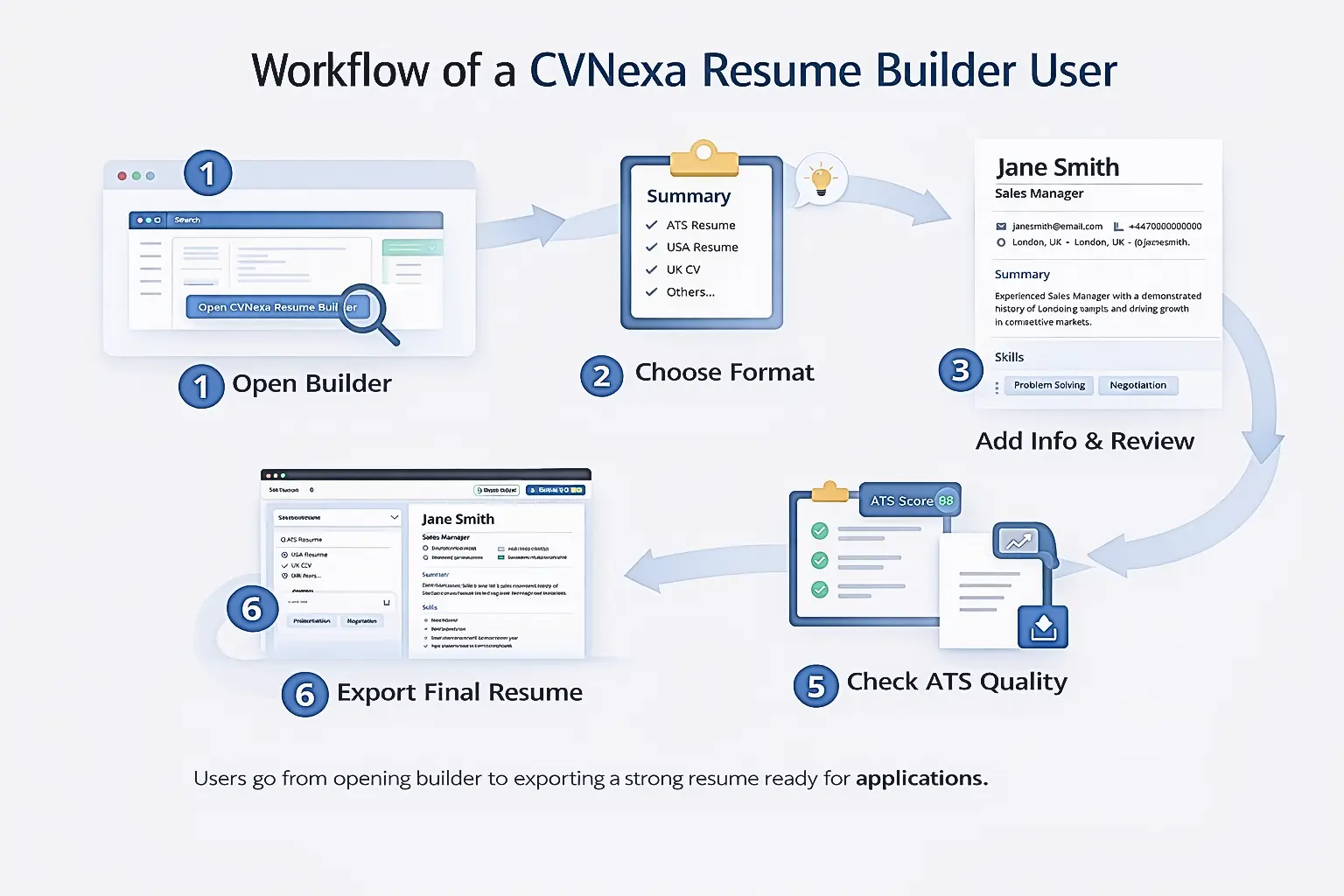
1. Choose a resume or CV format
Users can start by selecting the most suitable format based on region or application needs. CVNexa supports multiple styles, including ATS / International Resume, USA Resume, UK CV, EU CV, Germany CV, Gulf / Middle East CV, and Academic CV.
This helps users build a resume in a way that better matches regional expectations while still keeping the structure practical for online job applications.
2. Add personal and contact details
The next step is to fill in the core resume details such as full name, professional title, email, phone number, location, and LinkedIn or portfolio link. In some formats, users can also add optional metadata such as nationality, visa status, driving license, Date of Birth, and profile photo where regionally relevant.
These fields are important because they create the top identity layer of the resume and help recruiters understand the applicant quickly.
3. Add summary, experience, and supporting sections
Users can then build the main content of the resume by adding a professional summary, work experience, education, languages, certifications, and projects. The builder also supports skills suggestion chips and guided add-more sections, which makes it easier to build a more complete resume without needing technical formatting knowledge.
4. Watch the live resume preview update in real time
One of the most useful parts of the CVNexa Resume Builder is the sticky live preview. On desktop, users can continue editing on the left while the resume preview remains visible on the right. This helps users understand how their information will appear without needing to leave the builder or switch between screens.
5. Improve ATS quality and structured data
The builder includes an ATS Score widget and a Data Quality section. These features help users identify missing content, weak structure, or broken formatting in important fields. Instead of letting poor-quality values pass straight into the final resume, the builder now improves the consistency of fields such as email, phone number, links, and Date of Birth.
6. Generate, print, save, or share
Generate Resume refreshes the final status and export readiness, but the tool remains interactive throughout. Users can then use the export and share actions to print, save as PDF through the browser’s native print flow, or share the resume link. This keeps the process stable and avoids the blank-PDF problems that can happen with fragile third-party PDF libraries.
7 Powerful Steps to Use CVNexa Resume Builder Effectively
A resume builder works best when users treat it as a structured writing tool rather than just a form. The better the content entered into the tool, the stronger the final result will be. These seven steps help users get the most value from CVNexa Resume Builder.
Step 1: Open the CVNexa Resume Builder
Visit CVNexa Resume Builder and begin from the form section near the top of the page. The builder is designed so the form remains easy to use while the preview stays visible on the right on desktop.
Step 2: Choose the right country or CV format
Select the format that matches your target market or application style. This matters because some fields such as Date of Birth, nationality, visa status, driving license, and photo are more appropriate in some formats than others.
Step 3: Select the best resume variant
Choose the layout style that fits your goal, such as ATS Friendly, Pure ATS, Professional, Executive, Modern, or Compact. If maximum ATS readability is your main goal, ATS Friendly or Pure ATS are usually the safest options.
Step 4: Add strong personal details and a clear summary
Enter your full name, professional title, email, phone number, location, and LinkedIn or portfolio link. Then write a short summary that clearly explains your background, strengths, and target role. Keep it relevant, direct, and realistic.
Step 5: Add relevant skills and stronger work experience
Add skills that match the role you want. Then build your work experience using clean bullet points that focus on responsibilities, action verbs, and measurable results. A stronger experience section gives both recruiters and ATS systems better information to work with.
Step 6: Review the live preview and data quality
Watch the live preview while editing. This helps you identify weak sections, missing information, or messy formatting before export. Also review the ATS Score and Data Quality panels so you can fix problems early.
Step 7: Use Generate Resume as the final refresh step
Generate Resume is best used as the final refresh step before export. It updates readiness and final formatting, but the builder remains editable at all times. After that, you can download, print, or share your resume.
How CVNexa Helps Create a More ATS-Friendly Resume
ATS-friendly resume building is not only about keeping a simple design. It is also about making sure the resume data itself is clean and consistent. CVNexa Resume Builder has been improved to reduce common data-quality issues that often make resumes look weak or inconsistent.
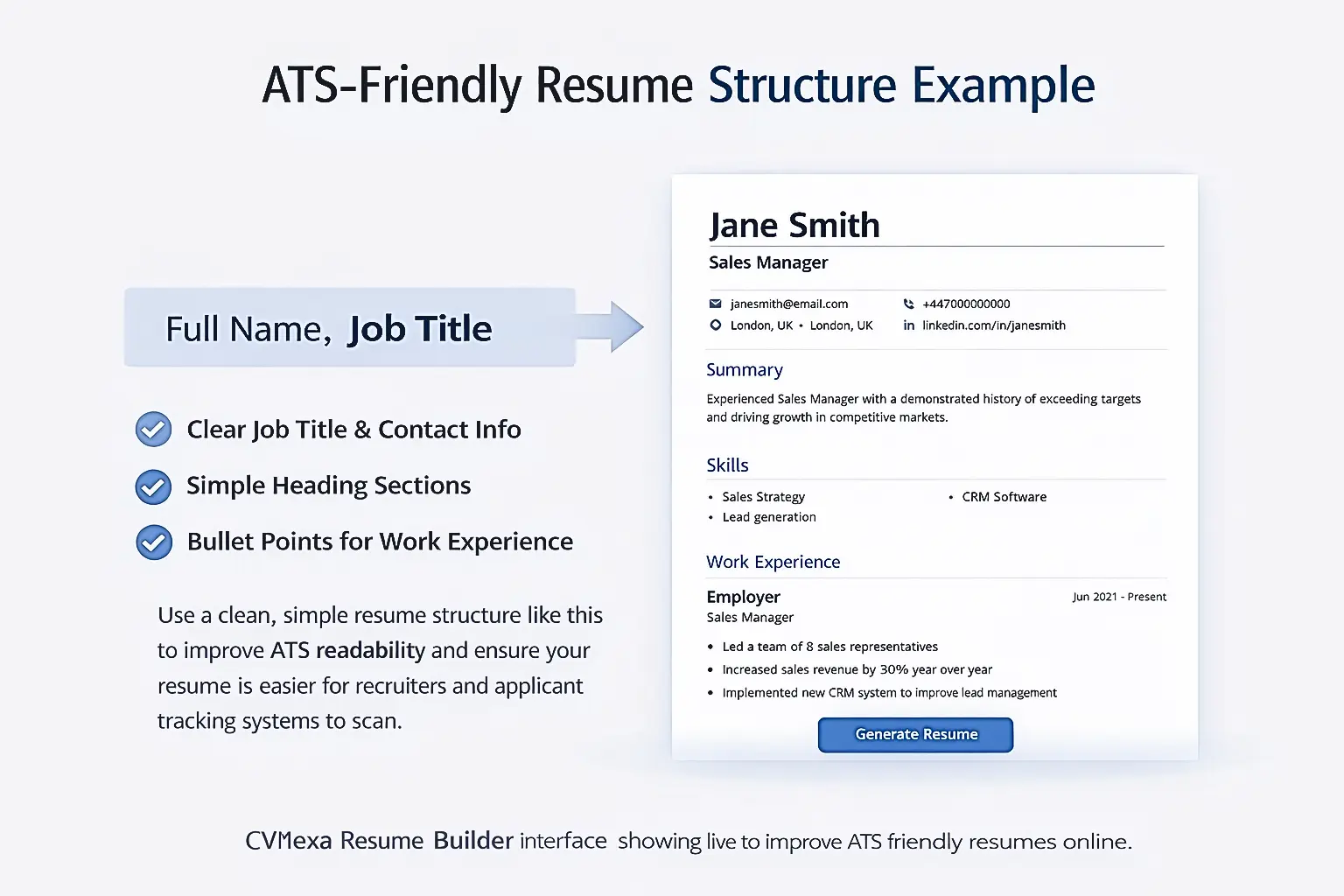
Structured Date of Birth handling
Date of Birth is now treated as a structured field where relevant formats support it. Instead of allowing broken free-text values, the builder uses a safer date-input approach and prevents malformed or unrealistic entries. It also keeps Date of Birth hidden by default in formats where it is generally not recommended as a modern resume best practice.
Email validation
Email values are cleaned and validated so that obvious formatting problems do not reduce resume quality.
Phone normalization
Phone numbers are cleaned into a simpler ATS-safe format so they are more readable and consistent in preview and export.
Link normalization
LinkedIn and portfolio links are cleaned so users can enter simple forms of their URLs without creating messy output.
Cleaner preview and export data
The tool stores and renders structured data more carefully before it appears in the preview or export layout. This improves readability and helps keep the final resume more consistent.
Common Resume Builder Mistakes CVNexa Helps Avoid
Job seekers often make the same mistakes when using online resume builders. CVNexa is designed to reduce these issues and help users build cleaner resumes from the start.
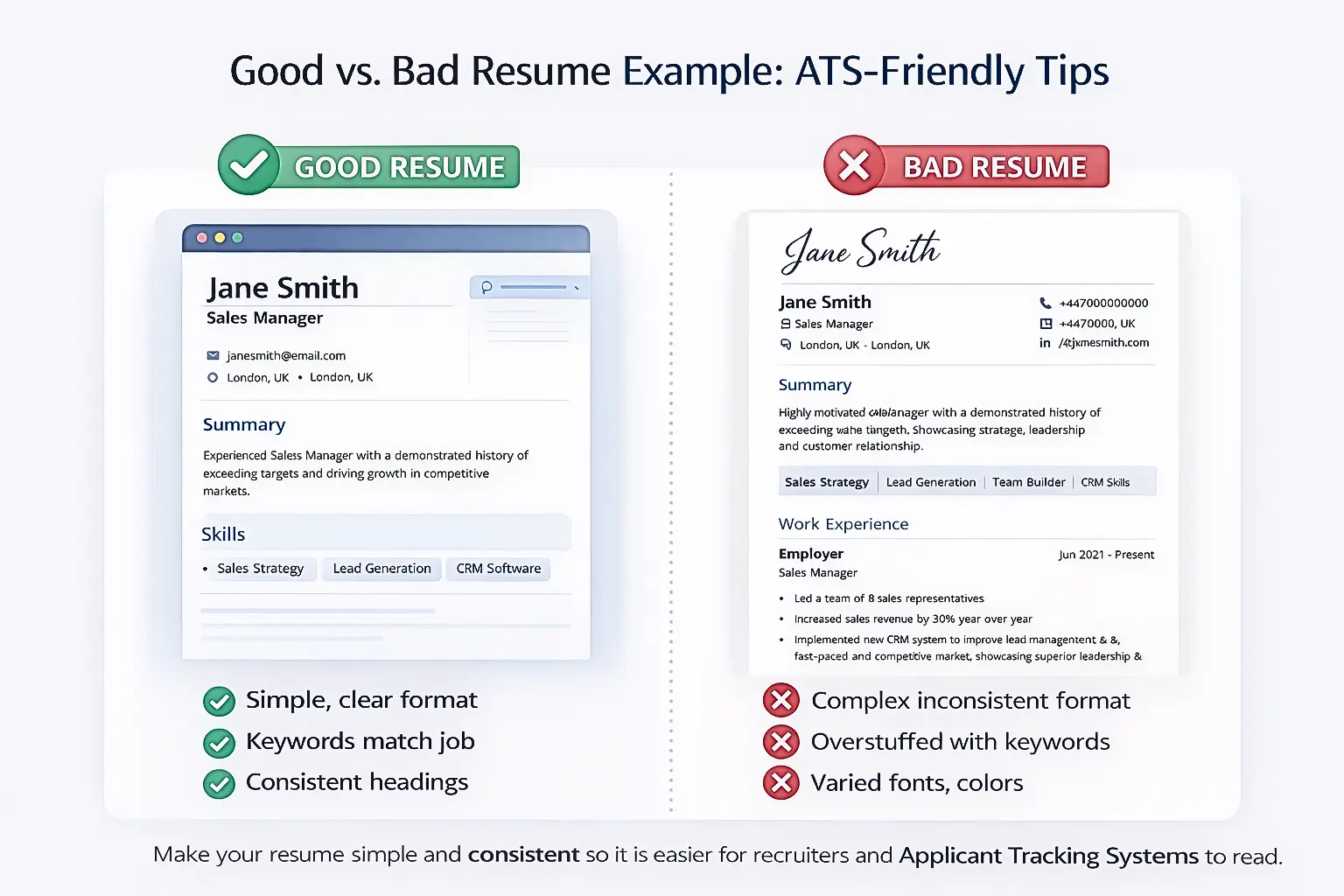
- Entering broken contact details
- Using weak or unclear job titles
- Leaving the summary too vague
- Adding poorly formatted structured fields
- Using resume data that looks inconsistent in preview or export
- Relying on export systems that produce broken PDF output
By improving structured input handling and keeping the layout practical, the builder makes it easier to avoid these common problems.
Who Should Use CVNexa Resume Builder?
CVNexa Resume Builder can be useful for a wide range of job seekers, including:
- students building a first resume
- entry-level candidates
- professionals updating an older resume
- career changers rebuilding their profile
- international applicants who need country-based CV options
- job seekers who want a cleaner ATS-friendly format
Because the builder balances usability and structure, it works well for both simple resumes and more detailed CV-style documents.
What to Do After Building a Resume
Building the resume is only the first step in a stronger application workflow. CVNexa is designed as a connected tools platform, so users can move from resume creation into the next stages of improvement.
After building a resume, users can continue with:
- ATS Resume Checker to review compatibility and improve resume strength
- Cover Letter Generator to turn resume details into a tailored supporting letter
- CV Templates to explore more downloadable resume and CV resources
This workflow supports a stronger product journey across the full CVNexa ecosystem: Build Resume, Check ATS, and then Generate Cover Letter.
Why This Matters for Job Seekers
A good resume builder should not only help users type faster. It should help them build a better resume. CVNexa Resume Builder is moving in that direction by combining guided editing, structured data cleanup, ATS-friendly formatting, region-aware options, and stable export behavior.
That means users get a tool that is easier to work with and produces a more reliable final result. Instead of guessing how the resume will look or discovering broken data only after export, they can build, review, improve, and export with more confidence.
Start Building Your Resume with CVNexa
If you want to create a cleaner, more practical, and more ATS-friendly resume, CVNexa Resume Builder is a strong place to start. The tool is free for now, the workflow is easy to follow, and users can move directly from resume creation into the next CVNexa tools without paying to begin.
Start here: CVNexa Resume Builder
Then continue with: ATS Resume Checker, Cover Letter Generator, and CV Templates.